Contents
Introduction
Building powerful, LLM-driven document applications often starts with an accurate and efficient parser. But for many real-world workflows, privacy is non-negotiable—sensitive files must run locally on your laptop, without a single byte touching the cloud.
That local setup also has to be fast. An ideal parser should reach 5 to 10 frames per second, which means a 100-page document can be parsed in about 10 to 15 seconds, fast enough for users to move straight into interactive Q&A. But speed alone is not enough. The parser also has to handle complex layouts, dense tables, and paragraphs that span pages, scanned documents, and multiple languages.
To find out whether existing tools could meet those requirements, we thoroughly benchmarked every open-source parser that could run on Mac hardware. We compared their accuracy, speed, power consumption, and other metrics. The result was straightforward: there is no single model that beats everything. Different models are better at different trade-offs depending on the task.
That insight led us to build DocDot, a tool that helps non-technical users install document-parsing models on Apple laptops tailored to their needs and then connect those models to downstream AI tools, including Codex, Claude Code, OpenClaw, Hermes and WorkBuddy.
Hardware & Scope Note: Our preliminary research suggests that local document parsing with deep learning models is currently much more feasible on Apple laptops with M-series Apple Silicon chips. For that reason, the initial benchmark is limited to Apple MacBooks with M-series chips. Windows and Linux laptop testing will follow in a later evaluation phase.
Evaluation Process & Methodology
Selected Candidate Models
Given the number of open-source document parsing tools now available, we grouped the main technical approaches into two categories:
-
Multimodal Large Language Model (VLM / MLLM) Approaches
For edge deployment, large multimodal models remain impractical for real-time local processing. Even smaller edge-oriented multimodal models with roughly 1B parameters typically decode at only about 100 tokens per second on laptop hardware. In PDF-to-Markdown conversion, a single dense page can require thousands of tokens. This large computational cost, combined with the minimal conversion efficiency of standalone MLLM/VLM models, renders them impractical for high-performance edge parsing.
-
Pipeline-Based Document Parsing
Pipeline-based methods split the task into isolated, but dependent sub-modules that form a processing pipeline. Because these methods usually have fewer parameters, they may be a good choice for local execution on laptops.
Therefore, our evaluation focuses strictly on Pipeline Backend Document Parsing methods, including both open-source frameworks and commercial tools, as long as they support local deployment and are publicly accessible.
Detailed list of evaluated models and feature breakdowns
| Features | PaddleOCR v3.7.0 | GLM-OCR v0.1.5 | MinerU v3.4.4 | LiteParse v2.5.1 | Docling v2.122.0 |
|---|---|---|---|---|---|
| Output Format | markdown, json | markdown, json | markdown, json | markdown, json | markdown, json |
| Scanned Docs | √ | √ | √ | √ | √ |
| Multilingual | 50+ Langs | CN, EN & 6 others | 50+ Langs | CN, EN | 50+ Langs |
| Layout Coordinates | √ | √ | √ | √ | √ |
| Tables | √ | √ | √ | √ | √ |
| Cross-Page Table | × | × | √ | × | × |
| Formulas | √ | √ | √ | × | √ |
| Image Extraction | √ | √ | √ | √ | √ |
| Charts | √ | - | √ | √ | √ |
| Handwriting | √ | √ | √ | × | √ |
Last updated September 11, 2026
Across the selected models, the fundamental capabilities—output formats, scanned-document parsing, layout coordinates, standard tables, and image extraction—are broadly supported. The remaining distinctions concentrate in four areas:
- Language support: PaddleOCR, MinerU, and Docling provide broad multilingual coverage (50+ languages), while GLM-OCR adds a handful of additional languages on top of Chinese and English, and LiteParse is limited to Chinese and English.
- Handwriting: every model except LiteParse supports handwritten text recognition.
- Cross-page tables: supported only by MinerU.
- Formulas & charts: LiteParse does not parse formulas, and GLM-OCR has not publicly stated chart extraction support.
Important Notes & Limitations:
Feature availability for third-party models is derived from their official public disclosures. Our empirical benchmark evaluation was conducted strictly on Chinese and English samples. Performance in other languages was not tested or compared.
Benchmark Dataset
To test parsing quality under realistic and difficult conditions, we built a single-page dataset with 4,231 page samples across 64 document categories, with no more than 100 pages per category.
Domain & Category Coverage:
- Financial & Securities: annual reports, quarterly filings, audit reports, ESG disclosures, IPO prospectuses, bond prospectuses, credit ratings, industry research, fund reports, and exchange disclosures.
- Government & Regulatory: official announcements, laws and policies, administrative documents, public forms, business licenses, and executed contracts.
- Academic & Educational: research papers, academic journals, presentation decks, textbooks, exam papers, and academic posters.
- Publishing & Media: print newspapers, weekly periodicals, magazines, and screenshots of web articles.
- Professional Documents: patents, medical documents, account statements, and investment research records.
Overall, the dataset encompasses Chinese, English, and mixed Chinese-English pages, featuring a combination of natural publishing layouts, office document layouts, and high-density tabular layouts.
Ground Truth: The ground truth data on each page include: manually annotated bounding boxes for each content element (paragraph, table, figure, equation etc.), reading order sequences, and structural table representations.
Annotation Format: Final ground-truth data are structured in Markdown/HTML format. Text blocks are linearized in strict reading order, tables retain full structural hierarchy via native HTML <table> tags, and embedded graphics/figures are extracted as standalone PNG references.
Evaluation Metrics
Our evaluation framework measures both extraction quality and hardware performance.
1. Accuracy Metrics
-
Text Edit Distance (Text Edit): character-level normalized edit distance between the parsed text which is NOT inside any table and formula and the ground truth.
-
Table TEDS (Tree Edit Distance Score): Tree Edit Distance (TED) between table parsing prediction and ground truth.
-
Formula CDM (Character Degree Match): Visual character matching rate between rendered images of parsed formulas and ground truths.
-
Overall Quality Score:
2. Performance & Hardware Metrics
- FPS (Frames Per Second): total page throughput per second.
- Peak Memory: maximum RAM usage during execution.
- Avg Total Power: average total system power during parsing, in watts.
- Avg CPU Power: average CPU power consumption, in watts.
- Avg GPU Power: average GPU power consumption, in watts.
- Model Size on Disk: Total disk space required to download and store the local model weights on disk.
Experimental Results
Accuracy Metrics
| Metric | PaddleOCR v3.7.0 | GLM-OCR v0.1.5 | MinerU v3.4.4 | LiteParse v2.5.1 | Docling v2.122.0 |
|---|---|---|---|---|---|
| Overall ↑ | 71.63 | 65.74 | 73.35 | 26.98 | 67.7501 |
| Table TEDS ↑ | 58.67 | 47.24 | 64.04 | 30.04 | 57.3682 |
| Formula CDM ↑ | 82.48 | 84.17 | 86.64 | 0 | 77.9101 |
| Overall Edit ↓ | 0.2694 | 0.35 | 0.3403 | 0.7156 | 0.3302 |
| Text Edit ↓ | 0.2626 | 0.3418 | 0.3063 | 0.491 | 0.3203 |
| Table Edit ↓ | 0.3216 | 0.4909 | 0.4698 | 0.6557 | 0.371 |
| Formula Edit ↓ | 0.2239 | 0.2173 | 0.2449 | 1 | 0.2993 |
Model Size on Disk
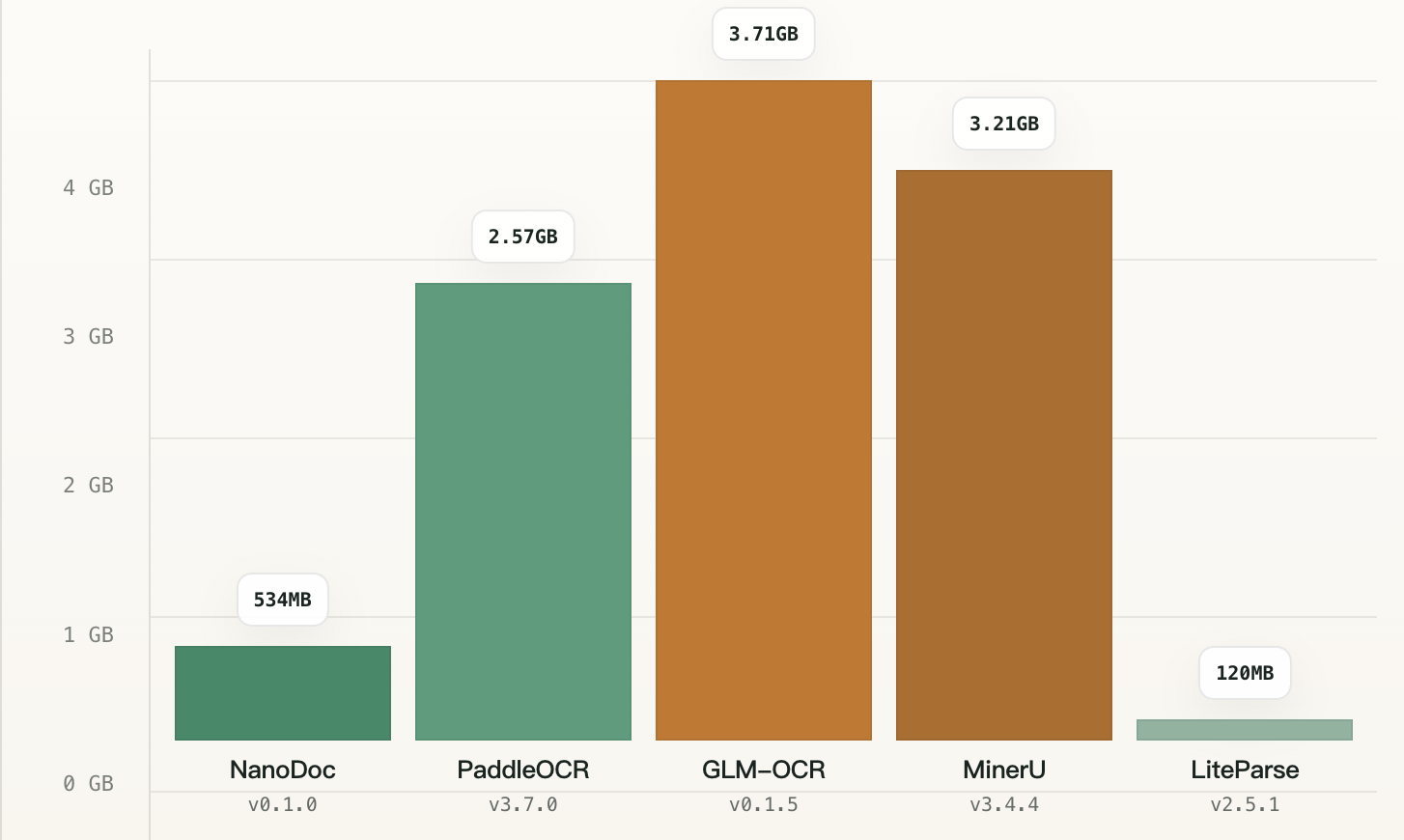
Model size varies significantly across different parsers, with GLM-OCR, Docling, MinerU, and PaddleOCR occupying a heavy 2.57 GB to 3.71 GB of local storage.
Runtime Metrics
Methodology note: mathematical formulas significantly increase parsing complexity and visual recognition workload, so runtime benchmarks are split into two distinct document test suites (over 100 pages each) to isolate this impact.
General PDF
Comprises standard business, government, and publishing documents with no mathematical formulas.
| Metric | PaddleOCR v3.7.0 | GLM-OCR v0.1.5 | MinerU v3.4.4 | LiteParse v2.5.1 | Docling v2.122.0 |
|---|---|---|---|---|---|
| FPS ↑ | 0.056 | 0.121 | 0.33 | 5.14 | 0.936 |
| Peak Memory ↓ | 11.31 GB | 14.15 GB | 14.07 GB | 2.70 GB | 5.28 GB |
| Avg Total Power ↓ | 7.16 W | 6.75 W | 8.90 W | 8.13 W | 15.29 W |
| Avg CPU Power ↓ | 7.16 W | 1.89 W | 7.95 W | 8.13 W | 13.90 W |
| Avg GPU Power ↓ | - | 4.86 W | 0.95 W | 0.00 W | 1.39 W |
Formula PDF
Comprises dense academic research papers with complex mathematical formulas.
| Metric | PaddleOCR v3.7.0 | GLM-OCR v0.1.5 | MinerU v3.4.4 | LiteParse v2.5.1 |
|---|---|---|---|---|
| FPS ↑ | 0.037 | 0.063 | 0.51 | 6.7 |
| Peak Memory ↓ | 12.19 GB | 13.79 GB | 6.55 GB | 2.61 GB |
| Avg Total Power ↓ | 6.68 W | 5.20 W | 8.51 W | 6.52 W |
| Avg CPU Power ↓ | 6.68 W | 1.75 W | 6.23 W | 6.52 W |
| Avg GPU Power ↓ | - | 3.45 W | 2.28 W | - |
DocDot: The Ultimate Solution for Document Parsing
Rooted in these empirical benchmark insights, we built DocDot to help non-technical users easily install and run document-parsing models on Apple Silicon laptops tailored to their specific needs, and effortlessly connect them to downstream AI tools.
1. Tailored Model Selection Interface
DocDot provides a simple, intuitive terminal interface that enables non-technical users to choose and install parsing models aligned with what matters most to them—whether that is maximum accuracy, a smaller memory footprint, or higher processing throughput (FPS).
Supported parsers include:
- PaddleOCR
- GLM-OCR
- LiteParse
- MinerU
- Docling
Getting started with these models is straightforward through simple CLI commands:
- Install DocDot:
curl -fsSL https://docdot.ai | bash - Install a provider:
docdot install <PROVIDER> - Switch your default provider:
docdot use <PROVIDER> - Parse a document to Markdown:
docdot -i <INPUT> -o <OUTPUT> --format markdown
2. High-Volume Parsing & Server Modes
When processing large batches of documents, reloading heavy AI model weights for every individual file wastes time and computational resources. To eliminate this, DocDot can run as a long-running server that other applications, scripts, or your web browser can communicate with directly.
DocDot offers persistent server modes to suit different needs:
-
Local Provider Server (Daemon / Background Mode): Runs directly in the background to handle continuous parsing requests from local scripts or terminal tools. Controlled using simple management commands:
Start the background server daemon
docdot serve startParse files while the server is running
docdot -i <INPUT> -o <OUTPUT> --format markdownCheck server health and status
docdot serve statusStop the server daemon
docdot serve stop -
Graphical Web UI Server: Designed for users who prefer a visual workflow over command-line interactions:
docdot webOnce launched, navigate to http://127.0.0.1:8173 in your web browser. This interface allows you to drag-and-drop documents, preview Markdown/JSON outputs in real time, and compare parsing quality side-by-side across different parsers.
(To stop the web server when finished, run
docdot serve stopor pressCtrl+Cin the active terminal window).
3. Agent & Downstream Integration
Install Agent Skill
Upon installation, DocDot automatically scans your system for supported AI agent environments—including Codex, OpenClaw, Claude Code, Hermes and WorkBuddy. Through an interactive terminal prompt, DocDot installs the required skills for your agents.
If you install an agent tool after setting up DocDot, run: docdot skills install. This command configures the integration and replaces your agent's default PDF parser with DocDot.
Model Context Protocol (MCP) Integration
DocDot supports the Model Context Protocol to serve document parsing context directly to compatible agents and applications.
To launch the MCP server: docdot mcp. Refer to your specific agent's documentation to complete the client-side configuration.
For advanced options including custom host addresses, port settings, and transport protocols—run: docdot mcp --help
4. Get Started with DocDot
- Installation:
curl -fsSL https://docdot.ai/install.sh | bash - Official Website: http://docdot.ai
For comprehensive configuration options, workflows, and advanced usage, please refer to our User Manual.
Conclusion
By bringing these parsing engines together into one local toolkit on Apple Silicon laptops, DocDot delivers multi-FPS document parsing speeds without cloud latency or privacy risks.
Limitations & Future Roadmap
- Roadmap: Native support for Windows and Linux operating systems is currently in progress.
DocDot remains committed to maintaining an open, modular ecosystem, and will continuously evaluate, benchmark, and integrate newly released parsing models so users always have access to the best local document-understanding tools.